job position has been filled
From October 1st, WP2 will use two-factor authentication (2FA). This means you'll sometimes need to confirm your login with an SMS code.
📱 Action needed before October 1st: verify your phone number in WP2
From October 1st, WP2 will use two-factor authentication (2FA). This means you'll sometimes need to confirm your login with an SMS code. Make sure your phone number in WP2 is correct so you don't get locked out.
🔒 Why
WP2 holds personal data, contracts, salary info, and store operations data. Today only a password protects it. 2FA makes sure it's really you logging in - even if your password is ever compromised.
⚙️ What's changing
You won't need a code every time - just occasionally, like on a new device or after a while without logging in. The code is sent by SMS to the number on your profile.
✅ What to do before October 1st
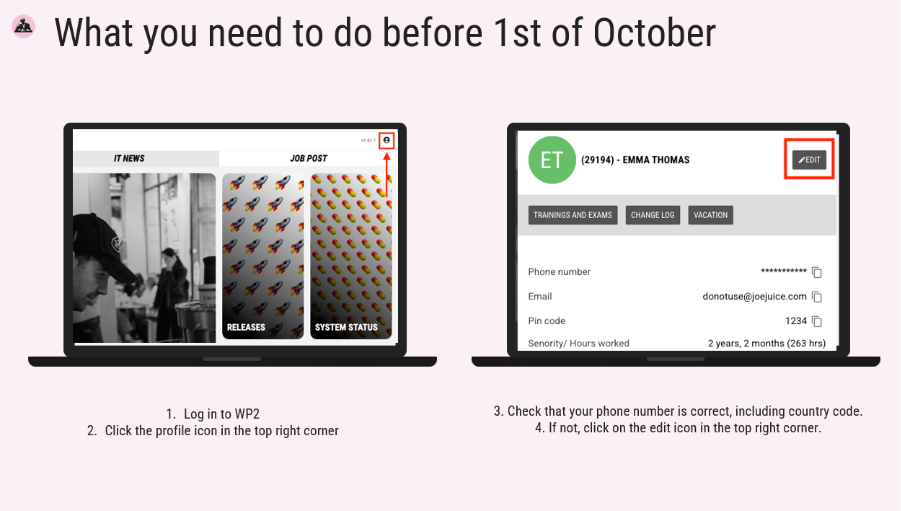
- Log in to WP2
- Click the profile icon top right
- Check your number is correct (incl. country code)
- If editable, update it yourself - if not, contact your manager
⚠️ If your number is missing or wrong, you won't be able to log in once 2FA kicks in.
🆘 If something goes wrong
- No code received: wait 2 min and try again. Check signal and that the number shown is correct
- Wrong number and can't fix it yourself: contact your store manager
- Manager unavailable, or you're a manager locked out: contact IT Support at helpdesk.joejuice.com
- Changed number or lost your phone: update it in WP2 before your next login
Small step, big impact - let's keep WP2 secure together. 💪